
Subscribe to our Newsletter
SHARE THIS BLOG
Manual consignor payouts are one of the biggest time drains in consignment retail. Every payout cycle means hours of cross-referencing sales, calculating commissions, deducting fees, and cutting individual checks or transfers — all while praying the math is right. This guide walks you through exactly how to automate consignor payouts on Shopify, from choosing the right tools to configuring commission rules and setting up payment methods that scale.
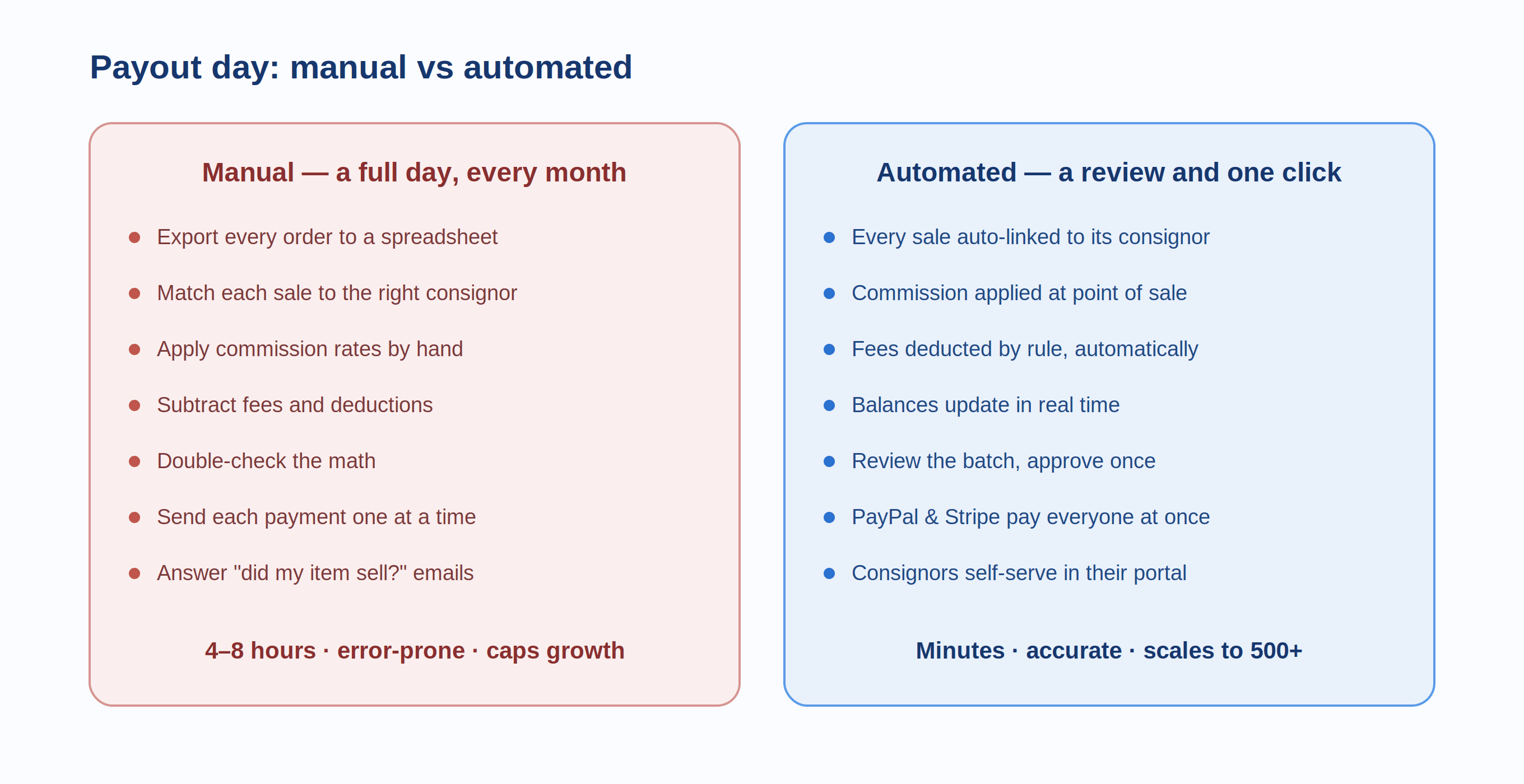
If you've ever spent a weekend reconciling consignor accounts in a spreadsheet, you already know the problem. A store with 15 consignors and a monthly payout cycle might spend 4-6 hours on payout calculations. Scale that to 50 consignors with different commission rates, and you're looking at a full day of administrative work every single month. One misplaced decimal, one missed sale, one forgotten fee deduction — and you've either overpaid (costing you money) or underpaid (costing you trust).
The shift from manual to automated payouts isn't about replacing human judgment. It's about eliminating the repetitive calculation work so you can focus on what actually grows your consignment business: curating great inventory, attracting buyers, and building consignor relationships.
This guide covers the full automation journey — why Shopify doesn't handle consignment payouts natively, which apps fill the gap, how to configure commission rules that match your business model, and the specific payout methods available to get money into your consignors' hands without manual intervention.
Why Shopify Doesn't Handle Consignor Payouts Out of the Box
Shopify is built for single-seller retail. When a customer buys something, Shopify processes the payment, deducts its transaction fee, and deposits the balance into the store owner's bank account. There's no native concept of splitting that payment between the store and a third-party consignor. Shopify doesn't track consignor accounts, calculate commission splits, or route partial payments to different recipients.
This isn't an oversight — it's a design choice. Shopify serves millions of stores, and the vast majority are single-vendor operations. Building consignment-specific financial workflows into the core platform would add complexity that 95% of merchants don't need.
The result is that every consignment store on Shopify needs a third-party solution to handle the gap between "customer paid for an item" and "consignor received their share." Without one, the workflow looks something like this: a sale happens in Shopify, the store owner exports the order to a spreadsheet, manually matches the sold item to its consignor, applies the correct commission percentage, deducts any fees, adds the amount to that consignor's running balance, and then — when payout day arrives — manually processes a payment through PayPal, bank transfer, or check. Multiply that by every sale across every consignor across every payout period, and you have a process that's practically designed to produce errors.
Generic retail POS systems like Square and Lightspeed have the same limitation. They track sales beautifully, but they don't understand the consignment concept of splitting revenue between the store and an item's owner. Some store owners try to work around this with product tags, custom reports, or elaborate spreadsheet formulas, but these workarounds break down as the business grows. The moment you have consignors with different commission rates, tiered pricing, or category-specific splits, manual tracking becomes unsustainable.
Standalone consignment platforms like SimpleConsign handle payouts within their own ecosystem. If you're weighing that approach against Shopify-native tools, our SimpleConsign vs PuppetVendors comparison breaks down the tradeoffs.
What Automated Consignor Payouts Actually Look Like
In a properly automated system, the workflow is dramatically different. Here's what happens when you have the right tools in place:
A customer purchases an item on your Shopify store. The app automatically identifies which consignor owns that item and applies their specific commission rate. The consignor's share is calculated instantly — net of your commission, payment processing fees, and any other agreed-upon deductions. That amount is credited to the consignor's balance in real time. The consignor can log into their portal at any time and see exactly which items sold, for how much, and what their current balance is.
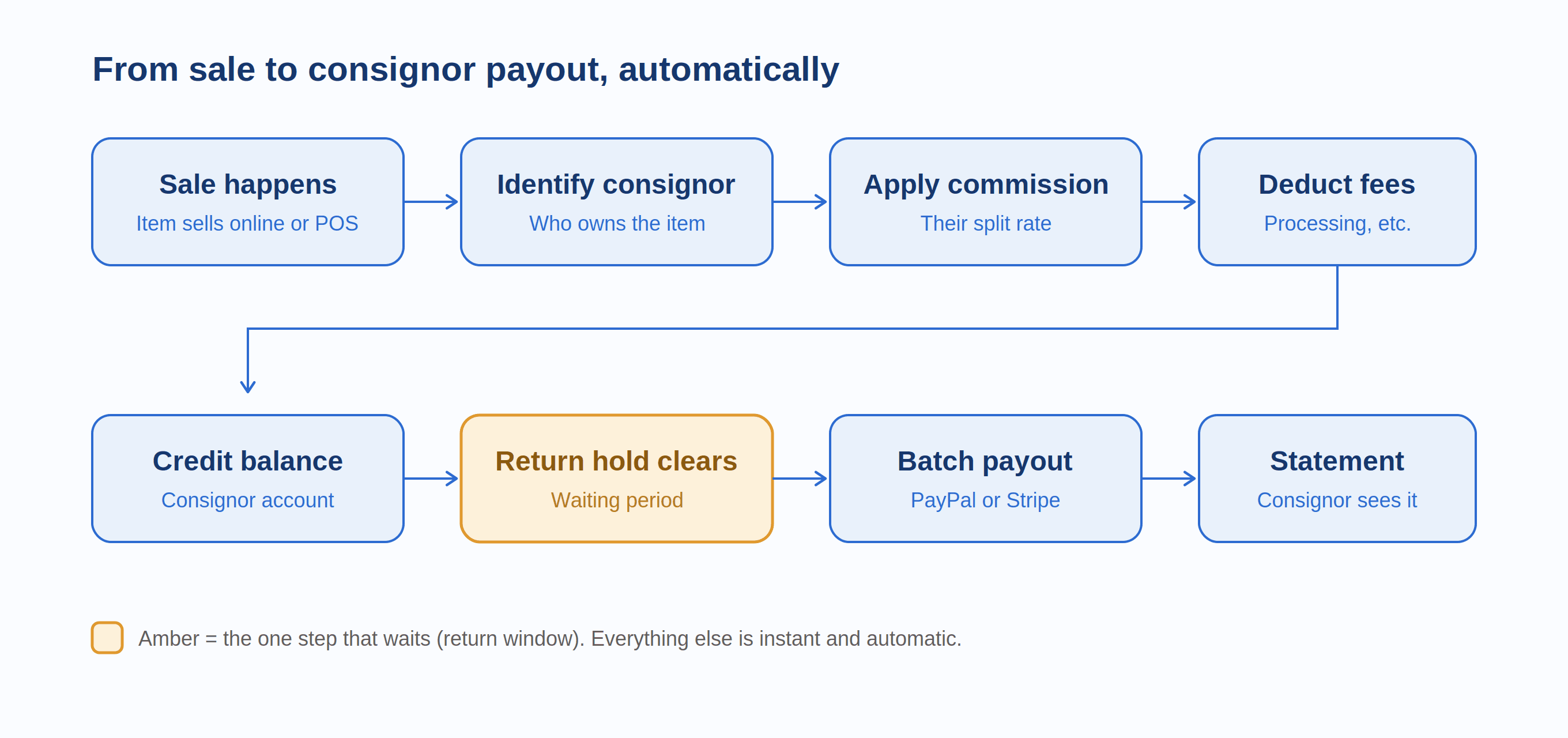
When your scheduled payout date arrives (weekly, bi-weekly, or monthly), the system generates a complete payout report for every consignor with a balance due. You review the totals, approve the batch, and payments are sent automatically through PayPal, Stripe, or bank transfer. Each consignor receives a statement showing every transaction that contributed to their payout. The entire cycle — from sale to settlement — happens with minimal manual intervention.
The difference this makes isn't just about saving time, though a store with 30 consignors might save 8-15 hours per month on payout administration alone. The bigger value is accuracy and trust. When consignors can see their sales and earnings in real time through a self-service portal, payout disputes drop to near zero. When commission calculations are handled by software rather than manual spreadsheet formulas, the risk of over or underpayment effectively disappears. And when payouts arrive on a consistent, predictable schedule, consignors trust the relationship and bring you their best inventory.
Choosing the Right Payout Automation Tool for Shopify
The Shopify App Store has several apps that address vendor and consignment payouts, but they vary significantly in scope, reliability, and how well they handle real-world consignment complexity. Here's what to evaluate:
Full Marketplace and Consignment Platforms
These apps handle the entire consignment workflow — vendor onboarding, product management, commission calculation, order routing, and payout processing — as an integrated system. They're the right choice if you want one tool to manage the complete consignment lifecycle rather than stitching together multiple apps.
PuppetVendors is a full multi-vendor marketplace and consignment platform for Shopify. It handles flexible commission rules (per vendor, per product, per SKU, and per category), automated payout calculations, and payment processing through PayPal and Stripe. Each consignor gets a dedicated vendor portal where they can track products, view sales in real time, and see their earnings.
Pricing starts at $49/month for up to 25 sellers and scales to $599/month for unlimited sellers, making it accessible for stores just starting their consignment operation and scalable for large multi-vendor marketplaces. The app supports 14 languages, includes Zapier and webhook integrations for connecting to accounting tools, and offers an open API for custom workflows. It's trusted by multi-vendor marketplaces, digital goods stores, art galleries, print-on-demand operations, and consignment businesses.
Shipturtle focuses on multi-vendor marketplace functionality with vendor syncing across platforms. It offers PayPal and Stripe payouts with commission automation. Pricing starts at $59/month but scales to $349/month, and some essential features like Stripe Connect are add-ons at additional monthly cost. It's a strong option for marketplaces where vendors maintain their own external stores and need product syncing, but the add-on pricing for payment features or any feature at all means the actual cost is higher than the base plan suggests.
Webkul Multi Vendor Marketplace is a feature-rich platform with PayPal Payout and Stripe Connect options. It handles order splitting, commission management, and vendor dashboards. The platform is comprehensive but has a steeper learning curve, and some users report that the setup process requires significant technical involvement.
Payout-Only Apps
These apps focus specifically on commission calculation and vendor payments, without the full marketplace management layer. They're useful if you're already managing consignor inventory through another method and just need the financial reconciliation piece.
CollabPay handles commission calculation and payouts via PayPal, Stripe, or bank transfer with multi-currency support. It works for consignment, affiliate, and royalty payment scenarios. However, some users have reported issues with currency conversion accuracy (particularly for international payouts) and complex setup processes for Stripe integration.
Vendor Payout has been on Shopify since 2014 and focuses on commission reporting and PayPal-based automated payouts. It supports percentage and fixed-amount splits configured by SKU or product tag. Pricing starts at $15/month for up to 50 vendors.
ConsignMint provides consignor management with sales tracking, commission calculation, and payout recording. It offers a vendor portal and reporting but requires manual payment execution outside the app.
Consignment-Specific Apps
These are purpose-built for consignment operations, often bridging the gap between POS systems and Shopify's e-commerce functionality.
Consignify links products to consignors within Shopify and automatically calculates commissions with flexible per-consignor or per-product rates. It includes a white-label portal and API access but focuses more on tracking and reporting than automated payment execution.
Circle-Hand combines inventory management with consignor payouts and includes AI image recognition for item intake. It's designed for physical consignment and thrift stores running Shopify POS alongside their online store.
ConsignCloud has been operating since approximately 2019 and offers integrated payouts with a consignor portal, email notifications, and Etsy integration for multi-channel consignment.
If you're still evaluating which consignment app is right for your store beyond just payout features, our comparison of the 10 best consignment software options for Shopify covers the full feature landscape.
How to Decide
The right tool depends on what stage your consignment business is at and how much of the workflow you want automated:
If you're launching a consignment store and want one platform to handle everything from vendor onboarding to payouts, a full marketplace platform like PuppetVendors gives you the complete toolkit without needing to stitch multiple apps together.
If you already have an established consignment workflow and just need to automate the payout calculation and payment, a focused app like Vendor Payout or CollabPay can plug into your existing process.
If you're running a physical consignment store with Shopify POS and need inventory management alongside payouts, a consignment-specific app like Circle-Hand or ConsignCloud is designed for that hybrid model.
Setting Up Commission Rules That Scale
The most common payout automation mistake is configuring a single flat commission rate and calling it done. This works when you have five consignors selling similar items at similar price points. It breaks down the moment your business becomes complex.
Global vs. Per-Vendor Commissions
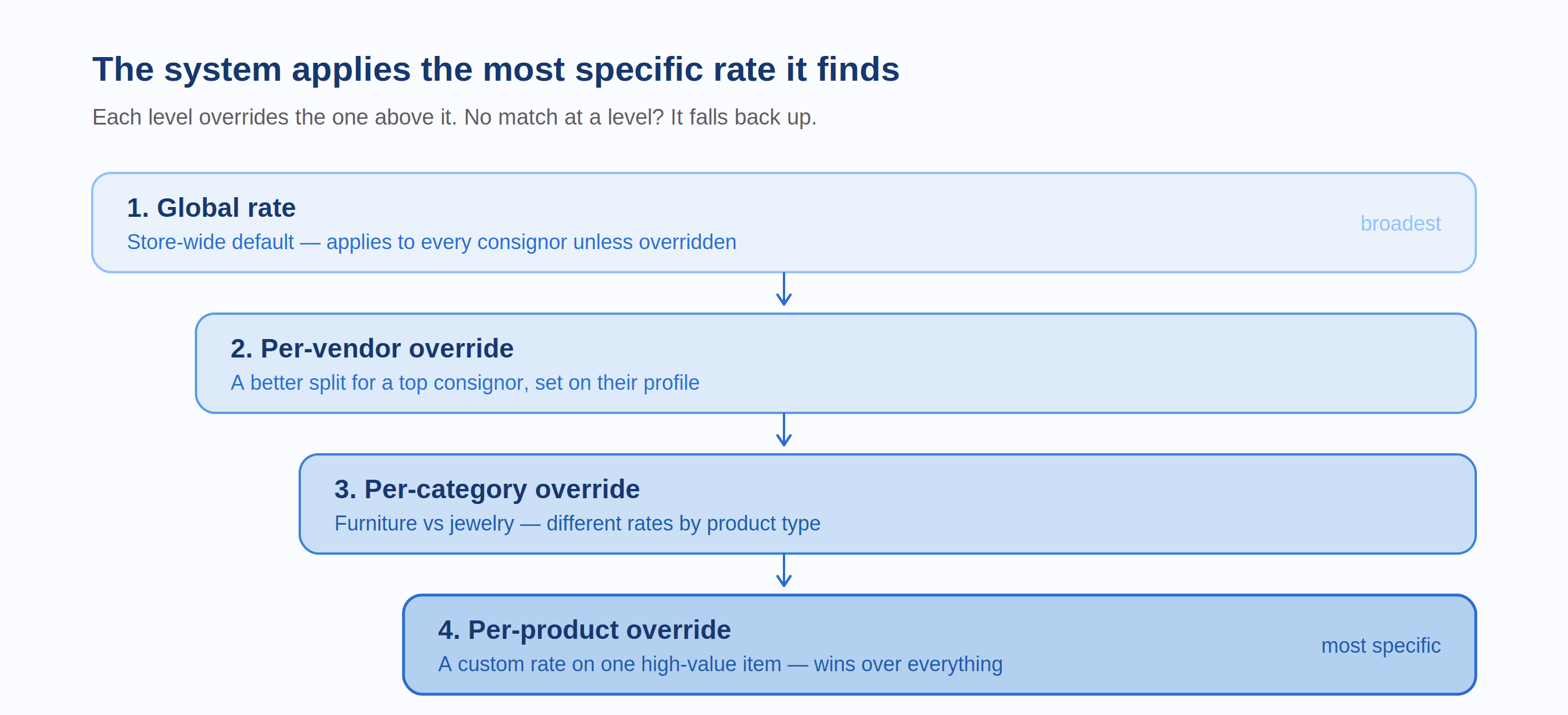
Your global commission rate is the default applied to all consignors who don't have a custom rate. For most consignment stores, this is the rate you offer new consignors before they've proven their sales volume. A typical starting point is 60/40 (consignor keeps 60%, store keeps 40%) for clothing, or 50/50 for art and high-handling-cost items.
Per-vendor overrides let you offer different rates to different consignors. Your top consignor who brings $5,000 in inventory every month and has a 70% sell-through rate should get a better split than someone who drops off three items and never follows up. Setting per-vendor rates in your payout automation tool creates a built-in loyalty incentive without requiring a separate loyalty program.
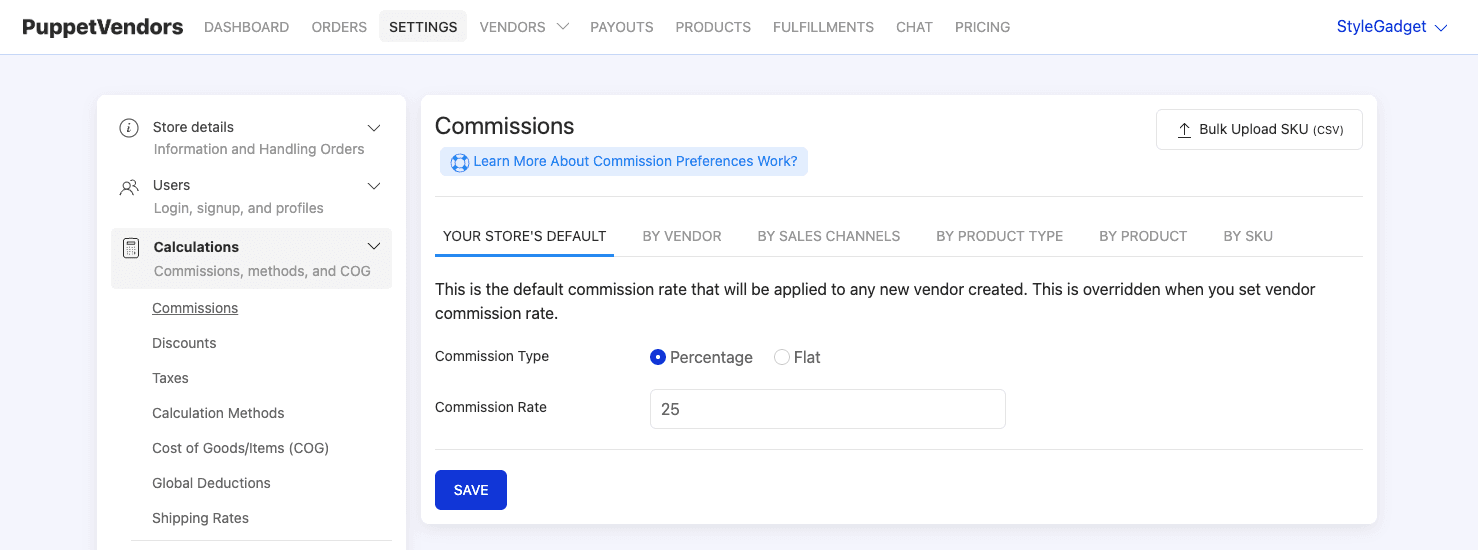
In PuppetVendors, you set the global commission rate at the store level and then override it for individual vendors through their vendor profile. The system automatically applies the correct rate at the point of sale — no manual selection required.
Per-Product and Per-Category Commissions
Some items deserve different commission treatment. A $2,000 vintage guitar and a $15 t-shirt shouldn't carry the same commission rate if you want your economics to work at both ends of the price spectrum.
Category-based commissions let you set different rates for different types of inventory. Furniture might carry a 50% store commission (reflecting high handling costs), while jewelry might be 30% (low handling, high value). Product-level overrides give you even finer control — useful for high-value individual items where you've negotiated a custom rate with the consignor.
The key is that your automation tool needs to support this hierarchy: global rate → vendor-level override → category-level override → product-level override. When a sale happens, the system should apply the most specific rate available, falling back to broader defaults when no override exists.
Handling Fees and Deductions
Commission percentage is only part of the payout equation. Most consignment agreements also involve deductions for payment processing fees (typically 2.6-3.5% on Shopify), shipping costs on online orders that the store fronts, listing or photography fees for premium services, storage fees for items held beyond an agreed period, and return-related costs when a buyer returns a consigned item.
Your automation tool should let you configure which of these deductions apply and whether they're deducted before the commission split (reducing both parties' shares proportionally) or charged against the consignor's share specifically. The cleanest approach for payment processing fees is to deduct them from the gross sale before splitting, since neither party controls those costs. Store-specific fees like photography or storage are more appropriately charged against the consignor's balance.
Document your fee structure clearly in your consignment agreement, and make sure the deductions are visible in the consignor's portal. Surprises on payout statements are the fastest way to lose consignor trust.
Configuring Payment Methods
Once commission calculations are automated, the next step is automating the actual transfer of money. Three primary methods dominate Shopify consignment payouts, each with different trade-offs.
PayPal Payouts
PayPal is the most widely supported payout method across Shopify consignment apps, and for good reason: virtually every consignor already has a PayPal account, setup is straightforward, and transfers can be processed in batch.
The standard PayPal Payouts API lets you send money to multiple recipients in a single batch. Each consignor provides their PayPal email address, and on payout day, the system sends each person their balance. Funds typically arrive instantly in the consignor's PayPal account.
The cost is manageable for domestic transfers — PayPal charges a fee per transaction (typically 2% capped at a maximum per payment for domestic transfers). International payouts are more expensive, with currency conversion fees and higher per-transaction costs.
One important caveat: PayPal Payouts (the batch payment API) requires a business account and, in some cases, approval from PayPal. This is different from a regular PayPal payment. Some store owners discover this during setup and face delays while their Payouts access is approved. Budget a week for this process if you're starting fresh.
Stripe Connect
Stripe Connect is the more modern and flexible option. It creates a direct payment pipeline where funds can be split and routed at the point of transaction, rather than pooled in the store's account and distributed later.
In a Stripe Connect setup, each consignor creates a connected Stripe account (either Standard or Express). When a customer makes a purchase, Stripe can automatically route the consignor's share to their connected account based on your commission rules. This means consignors receive their funds faster and the store never holds consignor money — a cleaner arrangement from both an accounting and legal perspective.
Stripe Connect also supports multi-currency payouts, which is valuable if you have international consignors. However, the setup is more complex than PayPal. Each consignor needs to complete Stripe's onboarding process (identity verification, bank account connection), which can be a friction point for less tech-savvy consignors.
Stripe's fees for Connect transfers are competitive: 0.25% + $0.25 per payout for Express and Custom accounts. This is often cheaper than PayPal for larger payout amounts.
Manual Methods (Bank Transfer, Check, Store Credit)
Not every consignor wants or needs digital payment. Some consignment stores — especially those with local, in-person consignors — use bank transfers (ACH), physical checks, or store credit.
Bank transfers (ACH) cost $0.20-$1.00 per transfer through most banking platforms and take 1-3 business days. They're economical for larger payouts but require collecting each consignor's bank details, which some people are uncomfortable sharing.
Checks are still surprisingly common in physical consignment stores. They're simple, familiar, and don't require the consignor to have any digital account. The downside is the manual labor of printing and mailing them, plus the float time before they're cashed.
Store credit is the most profitable option for the store owner because the money stays in your ecosystem. Some consignment stores offer a slightly better commission split for consignors who accept store credit instead of cash payouts. For example, a standard 60/40 cash split might become 65/35 if the consignor takes store credit. This works best for consignment stores where consignors are also regular shoppers.
Even if you use manual methods for the actual payment, your automation tool should still handle the calculation, statement generation, and record-keeping. The goal is to eliminate the math and reconciliation work, even if the final money transfer involves a manual step.
Setting Up Your Payout Schedule
Payout frequency is a business decision that balances consignor satisfaction (they want money sooner) with administrative efficiency (you want fewer payout cycles) and cash flow management (you need working capital between collections and payouts).
Monthly Payouts
Monthly is the most common schedule for consignment stores. Payouts are processed on a fixed date — the 1st, 15th, or last day of the month — for all sales in the prior period. This gives you time to account for returns (most return windows are 14-30 days), minimizes transaction fees by batching payments, and provides a predictable rhythm that consignors can plan around.
The downside is that consignors wait up to 60 days from the date of sale to the payout date (if an item sells on the 1st and payouts process on the 1st of the following month). For high-volume or high-value consignors, this delay can be frustrating.
Bi-Weekly or Weekly Payouts
More frequent payouts improve consignor satisfaction but increase your administrative load and transaction fees. Bi-weekly payouts are a good middle ground for stores with 20+ active consignors — frequent enough to keep consignors happy, infrequent enough to manage efficiently.
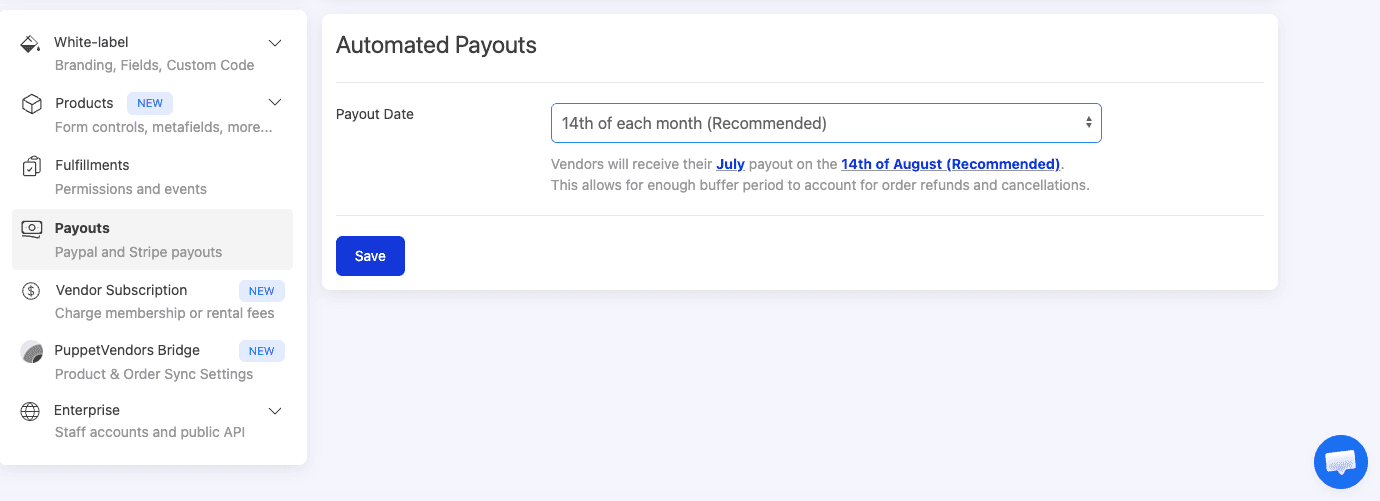
Weekly payouts are most common on marketplace platforms and among online-only consignment stores where the sales volume justifies the processing overhead. If you're using PayPal Payouts or Stripe Connect with automated batch processing, the incremental work of weekly payouts is minimal.
Minimum Payout Thresholds
Setting a minimum payout amount (typically $25-$100) prevents the inefficiency of processing tiny payments. If a consignor's balance is $8.50, it doesn't make sense to process a PayPal transfer with its associated fees. The balance carries forward to the next payout cycle until the threshold is met.
Communicate the threshold clearly in your consignment agreement and make sure consignors can see their accumulating balance in their portal. A consignor who sees $18.50 in pending earnings knows they're close to the $25 threshold and may be motivated to bring in more inventory.
Return Hold Periods
One of the trickiest aspects of consignment payouts is handling buyer returns. If you pay the consignor immediately when an item sells, and the buyer returns it two weeks later, you need to recover the payout or deduct it from the consignor's future earnings.
The cleaner approach is to build a return hold period into your payout schedule. If your store's return policy is 30 days, hold payouts for 30 days after the sale date before including them in a payout batch. This ensures you only pay consignors for final, non-returnable sales.
Most payout automation tools let you configure this hold period. In a multi-vendor marketplace app like PuppetVendors, you can set the hold period globally and the system automatically excludes recent sales that haven't cleared the return window.
The Consignor Portal: Transparency That Reduces Your Workload
Automated payouts solve the calculation and payment problem. A consignor portal solves the communication problem.
Without a portal, consignors contact you to ask questions like: "Did my blue vase sell?" "How much am I owed this month?" "When is the next payout?" "Why was my payout less than I expected?" Each of these questions takes time to research and answer. Multiply by 30 consignors asking variations of these questions monthly, and you've added hours of customer service to your workload.
A self-service portal eliminates nearly all of these inquiries. When consignors can log in and see their current inventory (what's listed, what's sold, what's expired), their sales history with dates, amounts, and commission breakdowns, their current balance and pending earnings, their payout history with downloadable statements, and their commission rate and any applicable fees — they stop asking you. The information is there, updated in real time, accessible 24/7.
The vendor portal in PuppetVendors gives each consignor a dedicated dashboard where they can track all of this, plus manage their own product listings, view inventory levels, and communicate with the store. For consignment operations specifically, the sales and payout transparency is what transforms the relationship from "I hope they're tracking my stuff correctly" to "I can see exactly how my items are performing."
This transparency has a direct impact on consignor retention. When people feel confident they're being paid accurately and on time, they bring more inventory and recommend your store to other potential consignors. The portal pays for itself not through direct revenue but through the consignor trust and volume it generates.
Step-by-Step: Automating Your First Payout Cycle
Here's a practical walkthrough for setting up automated payouts on a Shopify consignment store, using the general workflow that applies across most automation tools:
Step 1: Configure Your Commission Structure
Start with your global commission rate which is the default split for all consignors. Then set up any per-vendor overrides for consignors with negotiated rates. Not sure what rates to set? Our consignment commission rates guide has industry benchmarks for clothing, furniture, art, luxury, and digital goods. If you use category-based or tiered pricing, configure those rules next. Test the configuration by creating a sample product assigned to a consignor and running a test order to verify the commission calculation matches your expectations.
Step 2: Set Up Consignor Accounts
Create a vendor/consignor profile for each person who consigns with you. Include their contact information, agreed commission rate (if different from global), payment method preference, and payment details (PayPal email, Stripe account, or bank information). Send each consignor their portal login credentials so they can verify their information and begin tracking their account.
Step 3: Assign Products to Consignors
Every item in your Shopify store that belongs to a consignor needs to be linked to their account. Depending on your tool, this might mean assigning a vendor tag, selecting the consignor from a dropdown when creating the product, or having the consignor submit the product through their portal for your approval. This link is what tells the system how to split the revenue when the item sells.
Step 4: Configure Your Payout Schedule
Set your payout frequency (weekly, bi-weekly, monthly), your minimum payout threshold, and your return hold period. Choose your default payment method and ensure each consignor's payment details are on file.
Step 5: Run a Test Cycle
Before going live, run through a complete cycle with test orders. Place orders for items from several different consignors, verify the commission calculations are correct, confirm the deductions match your agreement, and process a test payout to ensure funds reach the intended recipients. Catch errors now, not when real money is on the line.
Step 6: Go Live and Monitor
Once you're confident the system is working correctly, switch to live operation. Monitor the first two or three payout cycles closely — review the payout reports before approving them, spot-check individual calculations, and ask a few consignors to verify their statements match their expectations. After the first few cycles run smoothly, you can reduce your oversight to a quick review before batch approval.
Common Payout Automation Pitfalls
Not Accounting for Discounts and Promotions
When you run a 20% off sale, who absorbs the discount — you or the consignor? If a consignor's item normally sells for $100 with a 60/40 split, and you discount it to $80, should the consignor receive $48 (60% of $80) or $60 (their share of the original price)?
Most automation tools calculate commissions on the actual sale price by default. If you want to protect consignors from store-wide promotions, you need to configure the tool to calculate commissions on the original listed price. Alternatively, address this explicitly in your consignment agreement: state that commissions are calculated on the net sale price after any store-applied discounts. Either approach works, but ambiguity leads to disputes.
Ignoring Tax Implications
Consignment payouts may have tax implications for both you and your consignors. In many jurisdictions, consignment income is reportable. If you pay a single consignor more than $600 in a calendar year (in the US), you may be required to issue a 1099-MISC or 1099-NEC. Your automation tool should be able to generate annual payout summaries per consignor for tax reporting purposes. Consult an accountant to understand your specific obligations — they vary by state and country.
Setting It and Forgetting It
Automation reduces manual work, but it doesn't eliminate oversight. Review your payout reports periodically to catch anomalies: an unusually high payout that might indicate a pricing error, a consignor whose sales dropped to zero (did their items get delisted accidentally?), or fee calculations that don't match your agreement terms.
Build a monthly 15-minute review into your routine: scan the payout summary for outliers, verify a few random calculations, and check that all consignors received their payments. This small investment prevents small errors from compounding into big problems.
Not Having a Dispute Resolution Process
Even with perfect automation, disputes will occasionally arise. A consignor might question a fee deduction, disagree about a return-related adjustment, or claim an item sold for more than the payout reflects. Having a clear, documented process for handling disputes — who to contact, what documentation is needed, how quickly you'll resolve it — prevents small misunderstandings from damaging the relationship.
Your consignor portal's transaction history is your best defense in disputes. When every sale, deduction, and payout is logged with timestamps and amounts, most questions can be resolved by pointing the consignor to the relevant entries in their portal.
How Payout Automation Impacts Your Bottom Line
The ROI of payout automation isn't just in time savings, though those are substantial. Here's how it affects your business financially:
Reduced administrative costs. If you or your staff spend 10 hours per month on manual payout calculations at an effective rate of $25/hour, that's $250/month in labor costs — more than the cost of most automation tools. A store with 50+ consignors might spend 20-30 hours monthly, making the math even more compelling.
Fewer payout errors. Overpayments directly reduce your margin. Underpayments reduce consignor trust and increase dispute-handling time. Even a 2% error rate on a $10,000 monthly payout volume means $200/month in misallocated funds.
Better consignor retention. Consignors who get paid accurately and on time, with full visibility into their accounts, are consignors who stick around. Retaining an established consignor is far cheaper than recruiting a new one, and long-term consignors tend to bring higher-quality inventory because they understand what sells in your store.
Faster scaling. Manual payout processes create a hard ceiling on growth. You can physically process only so many consignors before the administrative burden becomes unmanageable. Automation removes that ceiling — going from 15 consignors to 50 shouldn't require any additional payout administration time.
Improved cash flow visibility. When commission calculations are automated and visible in a dashboard, you always know exactly how much of your sales revenue belongs to consignors and how much is your margin. This makes financial planning, tax preparation, and profitability analysis dramatically easier.
Frequently Asked Questions
Can I automate consignor payouts on Shopify without an app?
Not effectively. Shopify has no native consignment or revenue-splitting functionality. You could build a manual workflow using spreadsheets and Shopify's order export, but this isn't automation — it's organized manual work that's prone to errors and doesn't scale. A dedicated app is the practical solution for any store with more than a handful of consignors.
What's the best payment method for consignor payouts?
PayPal is the easiest to set up and most widely accessible. Stripe Connect is more modern and enables real-time payment splitting, but requires each consignor to create a Stripe account. For local, in-person consignment, bank transfers or checks work fine. Many stores offer consignors their choice of method.
How often should I pay consignors?
Monthly is standard for most consignment stores. Bi-weekly or weekly payouts improve consignor satisfaction and are feasible with automated tools, especially for online-only stores. Match your payout frequency to your return policy — your hold period should be at least as long as your return window.
What's a reasonable minimum payout threshold?
Most consignment stores set minimums between $25 and $100. Lower thresholds are more consignor-friendly but increase your per-transaction costs. Higher thresholds are more efficient but can frustrate consignors with smaller balances. $50 is a common middle ground.
How do I handle payouts when a buyer returns an item?
The cleanest approach is to build a return hold period into your payout schedule that matches your store's return policy. Sales within the hold period are shown as "pending" in the consignor's balance but aren't included in the payout batch. If a return happens after a payout has already been processed, the amount is deducted from the consignor's next payout cycle.
Do I need to send tax forms to my consignors?
In the United States, if you pay a consignor $600 or more in a calendar year, you're generally required to issue a 1099 form. Tax requirements vary by state and country, so consult an accountant. Your payout automation tool should be able to generate annual summaries per consignor to support this reporting.
How much does payout automation cost on Shopify?
Payout automation is typically bundled into multi-vendor marketplace or consignment management apps. Costs range from $15/month for basic payout-only tools to $49-$599/month for full-featured platforms like PuppetVendors that handle the entire consignment workflow. The cost is almost always offset by the time savings, even a $49/month tool that saves 8 hours of manual work per month pays for itself many times over.
Can I set different commission rates for different consignors?
Yes, and most serious consignment stores do exactly this. Look for an automation tool that supports per-vendor commission overrides alongside a global default rate. PuppetVendors supports commissions at the global, vendor, product, and SKU level, giving you granular control over your commission structure.
Stop spending weekends on payout spreadsheets. PuppetVendors automates commission calculations, consignor payouts via PayPal and Stripe, and gives every consignor a self-service portal to track their sales and earnings. Plans start at $49/month for up to 25 sellers — less than what most stores spend on a single payout cycle's worth of manual labor. Start your free trial today.